REBEL DEZIGNS · TUTORIAL ARCHIVE
Pink Sunshine
An original Photoshop tutorial by René Kunert (giZZY), rebuilt from the preserved archive.
Materials Needed:
- Scrap kit by LGDezigns called Pink Sunshine
- Tube by the artist of your choice. I am using Elias Chatzoudis. This tube was purchased from MyPSPTubes.com but is now available at PSPTubesEmporium!
Open a new 550x550 pixel transparent canvas. (File > New...)
Open Glitter.png and move it onto your canvas.
You may either drag it from the layers pallet, or use your move tool to move the layer itself.
Position it about center and open Hearts.png
Move it onto your canvas and then go to Edit > Free Transfrom:
Look at the top of your screen and enter 50 in the H: and W: boxes (the first H)
Then click the check mark.
Position it at the bottom left corner of your tag.
Duplicate this layer and go to Select > All
Then Edit > Transform > Rotate 180°
Right click and Merge Down.
Select > Deselect
You can keep adding glitters in this way if you like.
Once you have all your glitters, right click and Merge Visible.
Use your marquee tool (selections) to select a circle in the center of your canvas:
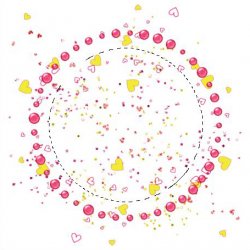
Create a new layer. (Layer > New > Layer...) Name it Frame.
Edit > Fill: Color or pattern of choice. (choose color or pattern from the dropdown menu)
Now right click this layer and choose Blending Options. Enter these styles in the popup window:
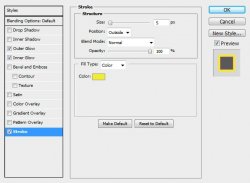
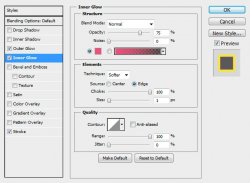
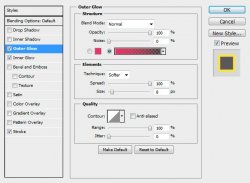
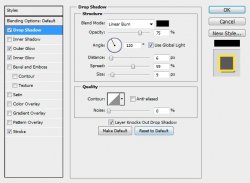
Open DazzleFrame1.png and place it on your canvas.
Edit > Free Transform > H: 50, W:50
Double click the layer's name in the layers pallet to rename it to DazzleFrame1.
Open HeartDoodle3.png and move it onto your canvas. Edit > Free Transform:
H: 85, W:85
Rename this layer to HeartDoodle3.
Place it at the bottom right of your tag. Bring up the blending options and give it a drop shadow of choice.
Open Single-Feather.png and move it onto your tag.
Edit > Free Transform:

Give this layer a drop shadow as well.
Rename this layer to Single-Feather.
Open Doodle4.png and move it onto your canvas.
Edit > Free Transform:

Now give it a drop shadow.
Rename this layer Doodle4.
Open Doodle1.png and move it onto your canvas.
Edit > Free Transform:

Give it a drop shadow.
Rename it Doodle1.
Open Yellow-Rose.png and move it onto your canvas.
Edit > Free Transform:

Give it a drop shadow.
Rename it Yellow-Rose.
Hide the Frame, DazzleFrame, and Glitter layers. (click the eye beside the layers in the layers pallet)
Right click the Yellow-Rose layer and Merge Visible.
Now you may unhide your frames and glitters.
Here is what I have so far:
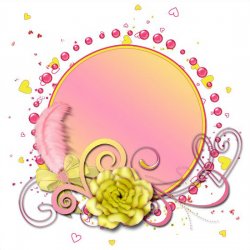
Select your Frame layer (the one we made out of a circle).
Open your tube and place it over the circle.
Give it a drop shadow and change the layer opacity to 60% (Blending Options: Custom tab)
Select the DazzleFrame layer and place your tube again.
Edit > Transform > Flip Horizontal
Give it a drop shadow.
Now add those copyrights.
Now just add a name, or phrase, or wordart of choice and save as a .png
I figured I would keep this one pretty simple, so I won't go into animation. Though that is always the fun part. But I will be nice this time.
And this is my result:

I hope you have enjoyed this tutorial! I would love to see your results.
Hosted by permission. Please link to this tutorial instead of redistributing it or its supplies.
Back to all tutorials