REBEL DEZIGNS · TUTORIAL ARCHIVE
Thank a Teacher
An original Photoshop tutorial by René Kunert (giZZY), rebuilt from the preserved archive.
Materials Needed:
- Kit by LG Dezigns called At The Library
- Tube by the artist of your choice. I am using Anjara. This tube was purchased from MyPSPTubes.com but is now available at PSPTubesEmporium!
Open a new 550x550 pixel image at 72 DPI
Open the bookcase and place it on your canvas.
Open the Flower-Sprinkle.png and place on your canvas.
Blur these a little and set the Blend Mode to Linear Dodge.
Hide these layers by clicking the eye icon in the layers pallet.
Open the two bookend elements and the books.png
Arrange them on your canvas like so:
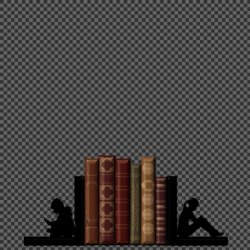
Merge visible.
Give them a drop shadow of choice.
Unhide your other two layers.
Open the fantasy-book.png and place it on your canvas.
Now right click this layer and open your Blending Options. Give it this layer style:
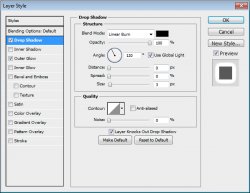
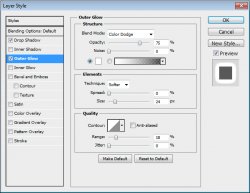
Now open Doodle3.png and place it on your canvas.
Edit > Free Transform:
W: -50%
H: -50%
Now position it at the top-left of your canvas. (if you are using CS5, rasterize this layer)
Duplicate the layer.
Select > All
Edit > Transform > Flip Horizontal
Select > Deselect
Right click the layer in the layers pallet and Merge Down.
Give this layer an outer glow set at Color Dodge.
Don't worry about the glow that is outside your image at this point. We will fix that later.
Here is what I have so far:
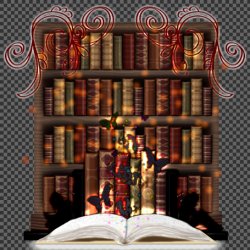
Now...
In your layers pallet, select your bottom layer.
Hold shift and select your top layer.
Layer > Group Layers
This will add all of your layers into a group.
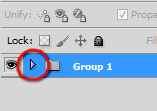
Open this group back up by clicking on the little arrow beside the name in the layers pallet.
Now we want to select the pixels of each layer.
CTRL + Click on the bottom layer's thumbnail. This works just like the Float/Defloat in PSP.
Now Hold Shift + CTRL and then click on the next thumbnail. This is important.
Do this to all of the layers.
Now you should have your selection around the entire image.
Select your Group 1 layer.
Layer > Layer Mask > Reveal Selection.
And like magic, no more glow outside your tag
 Ain't that neat?
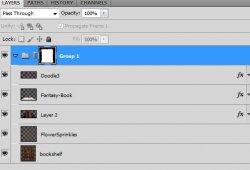
Here is what your layers pallet should look like now:
Now you can close your group by clicking the arrow beside the group name.
Open your tube of choice and place it on your tag.
Give it a drop shadow.
ADD THOSE COPYRIGHTS!
Give your tube a drop shadow of choice.
Add wording of choice and a name.
Done...
Save as a .png and display where desired.
Now wasn't this fun???
And this is my result:

I hope you have enjoyed this tutorial! I would love to see your results.
Hosted by permission. Please link to this tutorial instead of redistributing it or its supplies.
Back to all tutorials